Using the Address Book
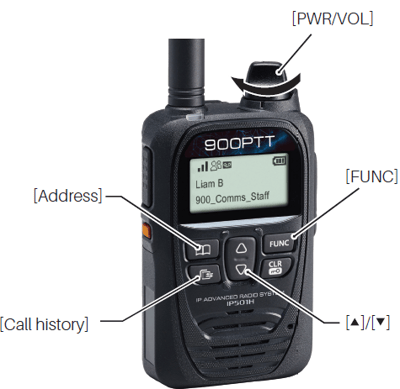
The [Address] key can be used, depending on a preset. Ask your dealer for details.
1. Select a call-to party from the Address book
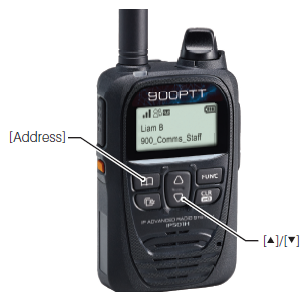
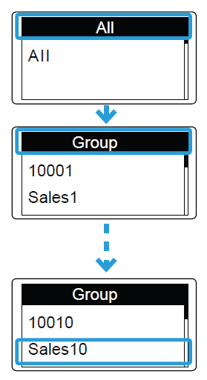
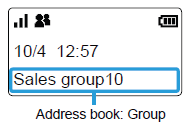
- Push [Address] to select a Call type. (Example: Group call)
ⓘ Push this key several times to select "All", "Group (Talkgroup)", "Individual", or "Phone*" - Push [▲]/[▼] to select a call-to party. (Example: Sales group 10)
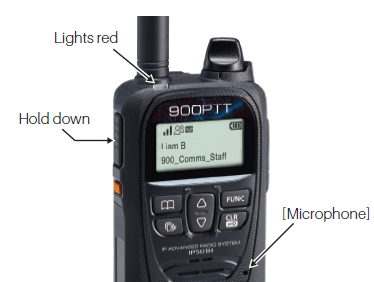
2. Hold down [PTT]
- While holding down [PTT], speak into the microphone.
- The [TR/RX] indicator lights red.
Using the Call History
The [Call History] key can be used, depending on a preset. Ask your dealer for details.
1. Select a call-to party from the Call History.
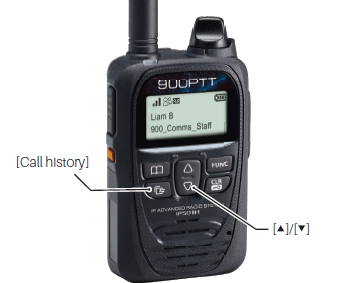
- Push [Call history] to select a call history ("RX log")
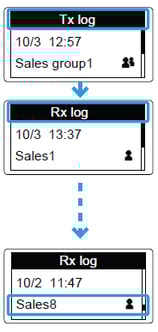
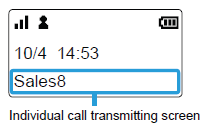
ⓘ Push this key several times to select "TX log", "RX log", "TX MSG log", "RX MSG log", "TX TEL log", or "RX TEL log". - Push [▲]/[▼] to select a call-to party. (Example: Sales 8)
About the history log:
Up to 10 logs can be stored. The oldest log is automatically deleted when the 11th call is received.
2. Hold down [PTT]
- While holding down [PTT], speak into the microphone.
- The [TR/RX] indicator lights red.
Deleting history logs:
- While holding down [FUNC], turn ON the power.
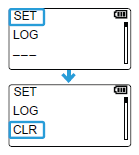
- Release [FUNC] when "SET" is displayed.
- Push [FUNC] or [Address] several times to select "LOG".
- Push [▲]/[▼] to select "CLR", then push [Call history].
All the histories except the recorded audio are deleted.