Registering VoCoVo devices is a 2-step process:
Step 1: Place the VoCoVo System in Registration Mode:
The method for placing your VoCoVo system into registration mode depends on the type of system you have.
For GO Systems:
Turn the power to the system off and on, when the system starts up it will be in registration mode.
Other Systems:
Follow the usual procedure for registering devices to your VoCoVo system. If you are at all unsure about this process, please contact your system administrator.
Step 2: Place the Device into Registration Mode:
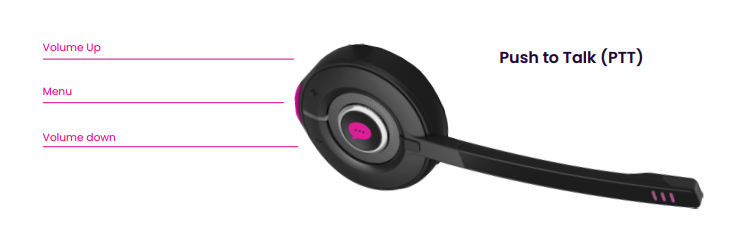
Ensure the VoCoVo Headset is switched off by holding the volume UP/Down and the menu buttons together, for about 3 seconds. The LED will flash twice and go out.
Enable registration mode by holding the volume up and down buttons and the Push to Talk (PTT) button together.